August 24, 2026
How to Stop AI Sprawl in Your Team
Stop wasting budget on redundant software. Learn how to run a strategic SaaS subscription audit to eliminate AI sprawl and secure your organization's data.
The Hidden Cost of AI Sprawl: A Step-by-Step Guide to Auditing and Consolidating Your Team's AI Subscriptions
We live in an era of unprecedented software democratization. With a corporate credit card and five minutes of free time, any employee can integrate a generative AI tool into their daily workflow. While this bottom-up adoption curve has unlocked historic levels of individual productivity, it has also introduced a quiet, compounding operational threat: AI sprawl.
AI sprawl occurs when team members independently adopt niche, overlapping, and uncoordinated AI tools. What begins as a harmless $20 monthly subscription for a single writing assistant quickly scales across departments. Within quarters, organizations find themselves paying for dozens of duplicate licenses, facing silent security vulnerabilities, and drowning in fragmented workflows.
Managing this chaos is not just about cutting costs. It is about reclaiming control over your corporate data, streamlining your operational stack, and ensuring your team works from a unified, secure foundation. This comprehensive guide details how to execute a thorough SaaS subscription audit and design a sustainable consolidation strategy.
Understanding the Genesis of AI Sprawl
To fix the problem, we must first understand how we arrived here. In traditional enterprise software procurement, the IT department acted as a strict gatekeeper. Software was evaluated, stress-tested for security, negotiated at scale, and deployed globally.
Generative AI disrupted this model entirely. Because many consumer-grade AI products are marketed directly to knowledge workers, adoption bypasses the traditional IT queue. A marketer signs up for a copy generation tool; a developer subscribes to an autocomplete code assistant; a product manager buys a transcription tool for meeting notes.
This decentralized model creates three distinct forms of operational drag:
-
Redundant Capabilities: Your marketing team might use Jasper, your product team might use copy.ai, and your customer success team might use Claude Pro. All three are executing remarkably similar tasks while operating on separate billing cycles and distinct data silos.
-
Underutilized Seats: Enterprise teams often buy tier-packaged licenses (e.g., a minimum of 10 seats) to access specific premium features, leaving several seats empty or completely inactive.
-
Shadow IT & Security Risks: When employees feed proprietary company data, customer databases, or product roadmaps into unapproved AI engines, they expose the organization to significant compliance and security vulnerabilities.
To combat these challenges, organizations must transition from reactive purchasing to proactive, strategic portfolio management.
The True Cost of Unmanaged AI Subscriptions
The financial impact of software waste is easily measurable, but the hidden operational and cognitive costs are often far more damaging to a company's bottom line.
Key Insight: True AI optimization is not simply about reducing spend; it is about maximizing the value generated per dollar of software investment. If your team is context-switching between five different AI interfaces, the cognitive load is destroying any efficiency gained from the automation itself.
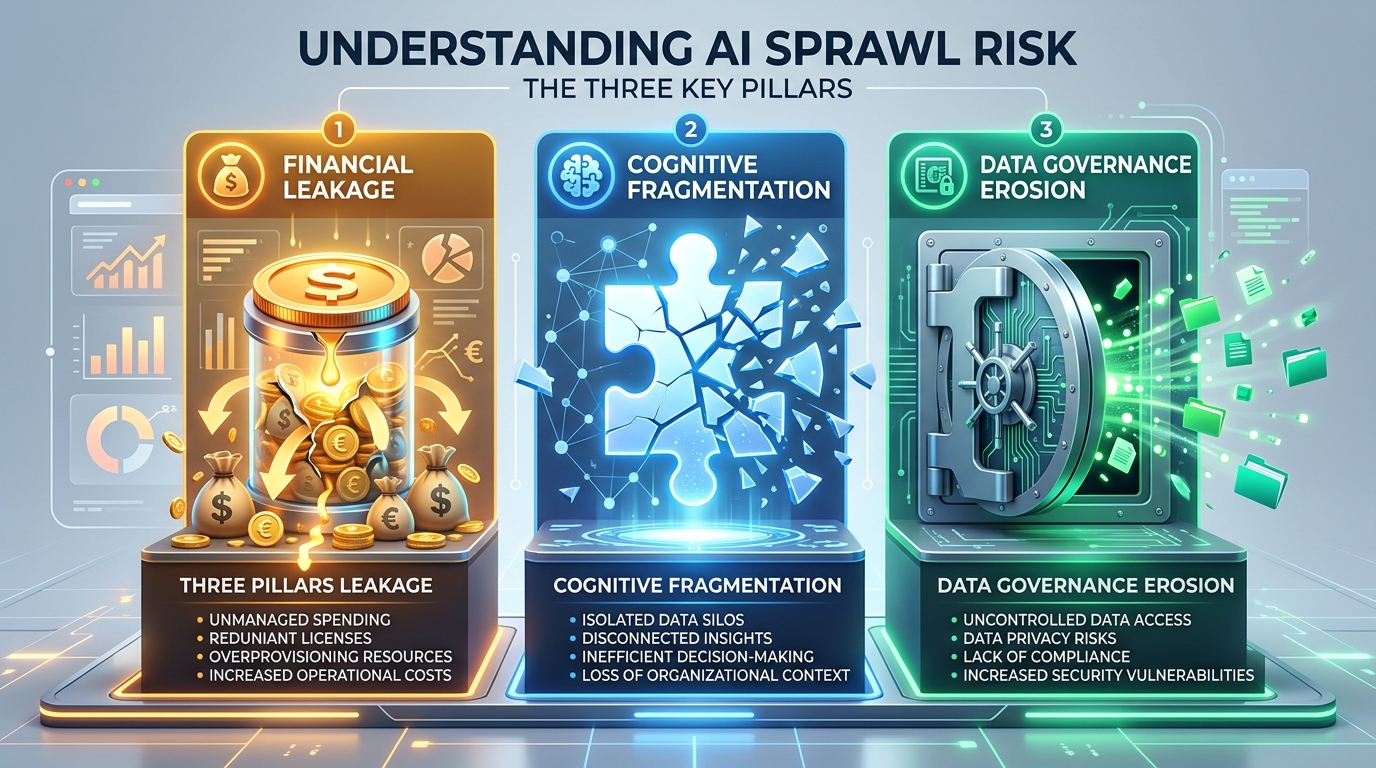
When evaluating your organization's exposure to AI sprawl, consider the three pillars of risk:
1. Financial Leakage
A team of 50 people can easily rack up $2,000 to $5,000 per month in unmonitored AI subscriptions. Over a fiscal year, this represents tens of thousands of dollars leaking from operating budgets that could be allocated to high-impact engineering or strategic hires.
2. Cognitive Fragmentation
When your tech stack is fragmented, your workflows follow suit. An employee might draft an email in one tool, run it through another to adjust the tone, use a third to summarize feedback, and use a fourth to generate accompanying graphics. This constant hopping between interfaces breaks focus and reduces creative flow.
3. Data Governance Erosion
Uncoordinated AI usage makes data tracking impossible. If your team is uploading raw customer interviews or strategic plans to third-party tools that train their models on public inputs, you are actively compromising your intellectual property.
A Step-by-Step Framework for a SaaS Subscription Audit
To reclaim control over your software ecosystem, you must conduct a structured SaaS subscription audit. This process requires cooperation between finance, IT, and department heads.
Below is a practical, four-step framework to inventory, evaluate, and consolidate your team's AI tooling.
Step 1: The Discovery Phase
You cannot optimize what you cannot see. Begin by gathering all transaction data from the past six to twelve months.
-
Audit Expense Reports: Run a query through your accounting software (such as QuickBooks, Expensify, or Ramp) for recurring charges under common software categories. Look for common AI vendors like OpenAI, Anthropic, Midjourney, Jasper, Notion, and Otter.ai.
-
Distribute a Tooling Survey: Ask your team members to list every AI tool they use, how often they use it, and what specific business problems it solves. Frame this survey positively: emphasize that the goal is to provide them with better, enterprise-grade tools, not to punish them for experimentation.
Step 2: Categorization and Mapping
Once you have compiled a master list of active subscriptions, map them by their primary functional capabilities. Use the categorization template below to organize your findings:
| Tool Name | Department | Monthly Cost | Primary Function | Data Input Sensitivity | Redundant? (Yes / No) |
|---|---|---|---|---|---|
| ChatGPT Plus | Marketing | $20 | Copywriting & Research | High (Customer Data) | Yes (Claude also used) |
| Claude Pro | Product | $20 | Code Review & Drafting | Medium (Code Snippets) | Yes (ChatGPT also used) |
| Otter.ai | Sales | $30 | Meeting Transcription | High (Client Calls) | Yes (Zoom AI Companion active) |
| Midjourney | Creative | $30 | Visual Asset Generation | Low (Public prompts) | No |
Step 3: The Value-to-Cost Evaluation
For each tool identified, evaluate its return on investment (ROI). Ask your department leads to justify the tool based on two metrics:
-
Adoption Rate: How many assigned seats are actively using the software at least three times a week?
-
Feature Overlap: Does an existing, enterprise-approved platform (such as Microsoft 365, Google Workspace, or Salesforce) already offer a comparable feature built-in? For example, paying for separate transcription software is highly redundant if your video conferencing platform already includes AI-driven summaries.
Step 4: The Consolidation Decision
With your map complete, categorize every tool into one of four action items:
- Keep: High-utility, unique tools that serve a clear, secure business function.
- Upgrade: Individual accounts that should be consolidated into a centralized, secure corporate enterprise plan.
- Replace: Tools that should be phased out in favor of built-in features on platforms you already pay for.
- Eliminate: Underutilized, redundant, or insecure platforms that must be cancelled immediately.
Strategizing the Consolidation: From Fragmentation to Unity
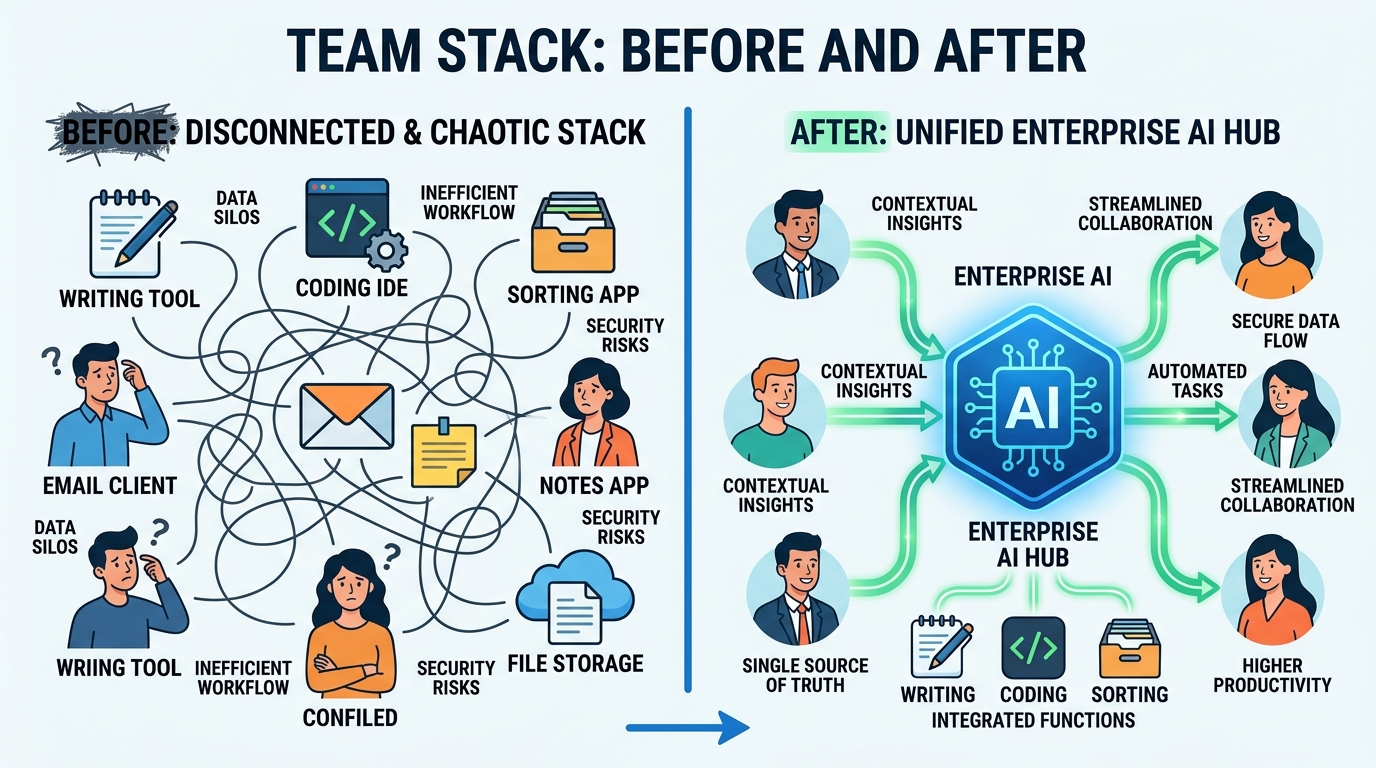
Once your audit is complete, the transition phase begins. Consolidating your tools is a change-management process that requires clear communication to prevent team friction or a drop in productivity.
Standardize on Multimodal Platforms
The most effective way to eliminate point-solution sprawl is to standardize on powerful, versatile foundation platforms. Instead of paying for a separate writing tool, a separate brainstorming tool, and a separate basic analysis tool, provision enterprise seats for a top-tier multimodal platform such as ChatGPT Enterprise or Claude for Teams.
These centralized platforms offer broad capabilities, including document analysis, coding assistance, copy generation, and data visualization, under a single, IT-managed dashboard. This approach simplifies billing, lowers per-seat costs, and ensures robust security controls.
Leverage Existing Platform Ecosystems
Before purchasing a new niche AI tool, look closely at your existing enterprise suite. Many organizations are completely unaware of the AI capabilities already included in their core software agreements:
-
Collaboration Suites: Google Workspace (Gemini) and Microsoft 365 (Copilot) offer robust text creation, slide design, and spreadsheet analysis natively.
-
CRM & Support: Salesforce, HubSpot, and Zendesk have deeply integrated AI layers for draft creation, customer ticketing, and lead scoring.
-
Project Management: Platforms like Notion, Asana, and ClickUp have built-in AI modules that summarize project boards and draft updates, eliminating the need for standalone document summarizers.
Implementing Governance to Prevent Future Sprawl
Consolidation is not a one-time event; it is an ongoing discipline. Without clear guidelines, AI sprawl will slowly return as new tools hit the market. To protect your optimized stack, establish a lightweight but effective governance framework.
Define an AI Procurement Policy
Create a simple, documented path for tools to enter your company ecosystem. The policy should state that any new AI platform must go through a quick review process before being purchased or expensed.
This review should confirm two simple points: first, that the tool does not duplicate the core features of an already approved tool; and second, that its data privacy policy explicitly guarantees company data will not be used to train public models.
Build a "Self-Service" Approved Tool Directory
Maintain a central, internal directory of approved AI tools, complete with quick guides on how to access them. If a team member feels they need an AI solution, their first step should be to explore the internal directory. Often, they will find that another team has already vetted and adopted a tool that meets their exact needs.
Encourage Structured Experimentation
While control is important, you do not want to stifle innovation. Create a structured "sandbox" environment where team members can request short-term, low-cost trials for novel AI tools. Set a strict time limit, such as 30 days, to evaluate the tool. If the trial proves highly successful and shows a clear return on investment, you can then formally integrate it into your official tech stack.
By combining clear guidelines with room for creative experimentation, you can keep your technology stack lean, agile, and highly productive.
Related Reading
To learn more about optimizing your workflows, auditing processes, and building highly efficient operational engines, explore our deep-dives:
Enjoyed this article? Join the Growency newsletter
Practical AI tips for service businesses, straight to your inbox. No spam, unsubscribe anytime.